Android is an open source operating system for smart phones which is running on a Linux Kernel. Java is the language used for developing android platform and applications. Since it is open source there are plenty of free training,development help and free sample codes available in the net. As you know the Android phones are making revolutions in the mobile phone market. Android gives you an exciting, free platform to make useful applications for the different branded Android phones available in the market and you may also make money from it. If you are new to the Android development and Java the best thing is to know the basic of XML and Java before starting development in Android. Interesting thing is that you can start developing in Android even if you don't have any knowledge in software development. Everything is available in the net.
You may First download the Android Software Development Kit (SDK) (choose skip add in the next screen) from here or the link given in the side bar. (TIP) Since it is 398MB don't directly download using Chrome or Forefox because if your connection is interrupted the download will be automatically cancelled and you will have to download it again. Best thing is to use Internet Download Accelerator (Click here). It will download much faster as it will make many connections to the download site. You can also pause it and resume it on the next day.
(See the image below)
Go the Android site by clicking the link and click on the download link as shown below.
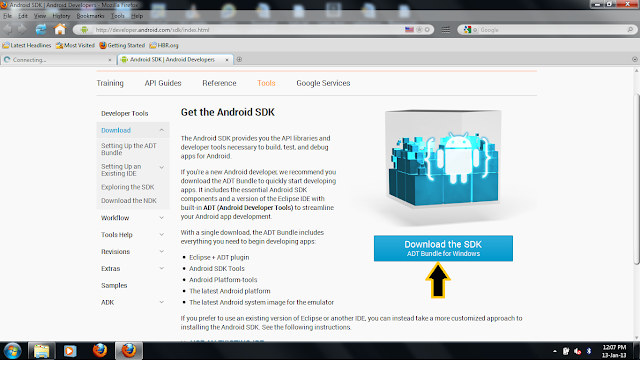
Now click to agree to the terms and conditions, select 32bit or 64 bit, if you don't know your system is 32 or 64 bit then follow the instruction down below to check it.

(TIP) If you don't know your system is 32 bit or 64 bit, then Right click on the icon named "Computer" and click "properties" Now a window named "basic information about your computer is opened, The system types specifies it is 32 bit or 64 bit. (see the image below for details)

Now click download and Download will automatically started. If you use Internet Download Accelerator,
it will automatically detect the link and start downloading. IF not clcik the green plus button on the tool bar and copy,paste the download link and click "start download". (see the image for detials)

When your download completes go the folder where the file is downloaded and clcik the zip file named
"android adt...." to open it in Winzip. (as shown below)
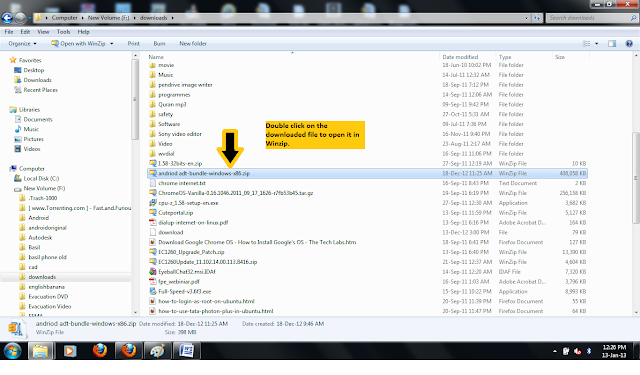 Now the files will be opened in Winzip, select all files by clicking Ctrl+A and click extract from the toolbar above. Choose a location to extract, better create a new folder named "android". Be sure that the "use folder name" is checked otherwise check it.(TIP) If not, it will not make any inner folders required to run Eclipse. (see image for details)

Now all the files will be extracted and the folder window is automatically opened (as shown below). Now double click on the folder named "adt-bundle..." to open it.
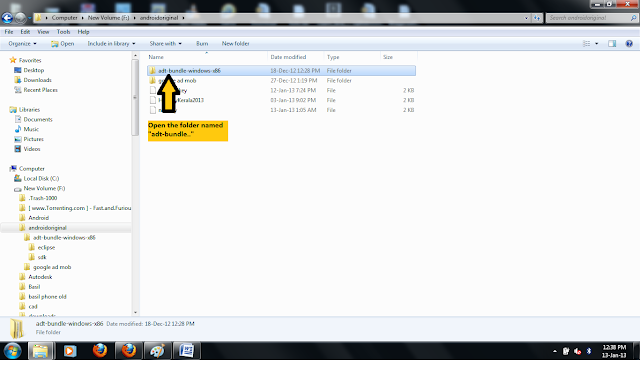
Now you can see a folder named "eclipse" click to open it. (as shown below)

Inside the folder you can see a file named "eclipse.exe" click on the icon to launch Eclipse. Note that android uses Eclipse, an open source platform with ADT (Android Development Tools) plugin to develop Android applications. (TIP) Please note that there is no need to install it in Windows. That's why the exe file is directly available. (TIP) Just right click on the file and make a shortcut to the desktop so that you can launch it easily next time. You don't have to worry about other files and folders as everything will be accessible from Eclipse.
The Android Developer site will also give you all the directions for downloading and running the SDK. You may also download it for Linux,Windows and Mac. Now you have successfully completed the first step in Android Development. We will discus the other topics in the next chapter. Mean while just go through the resources links on the right side to learn about Android Development. If you are new to Jave read this PDF Learn Java For Android
(TIP) If you read pages from 43 to 82 you will get a basic idea.
(TIP) Eventhough I have explained it for Windows, I strongly suggest you to use Ubuntu Linux for Android Development, as the emulator is slow, always crashing and not responding in Windows. Unlike Windows, Ubuntu is a cute,very fast,quick booting and easy to use OS with 1000's of free softwares. In Ubuntu ADT is very fast and stable. Setting up ADT bundle in Ubuntu is as easy as in Windows. You may Download Ubuntu free from here (750MB)
Now you can move to the NEXT CHAPTER
You may First download the Android Software Development Kit (SDK) (choose skip add in the next screen) from here or the link given in the side bar. (TIP) Since it is 398MB don't directly download using Chrome or Forefox because if your connection is interrupted the download will be automatically cancelled and you will have to download it again. Best thing is to use Internet Download Accelerator (Click here). It will download much faster as it will make many connections to the download site. You can also pause it and resume it on the next day.
(See the image below)
Go the Android site by clicking the link and click on the download link as shown below.
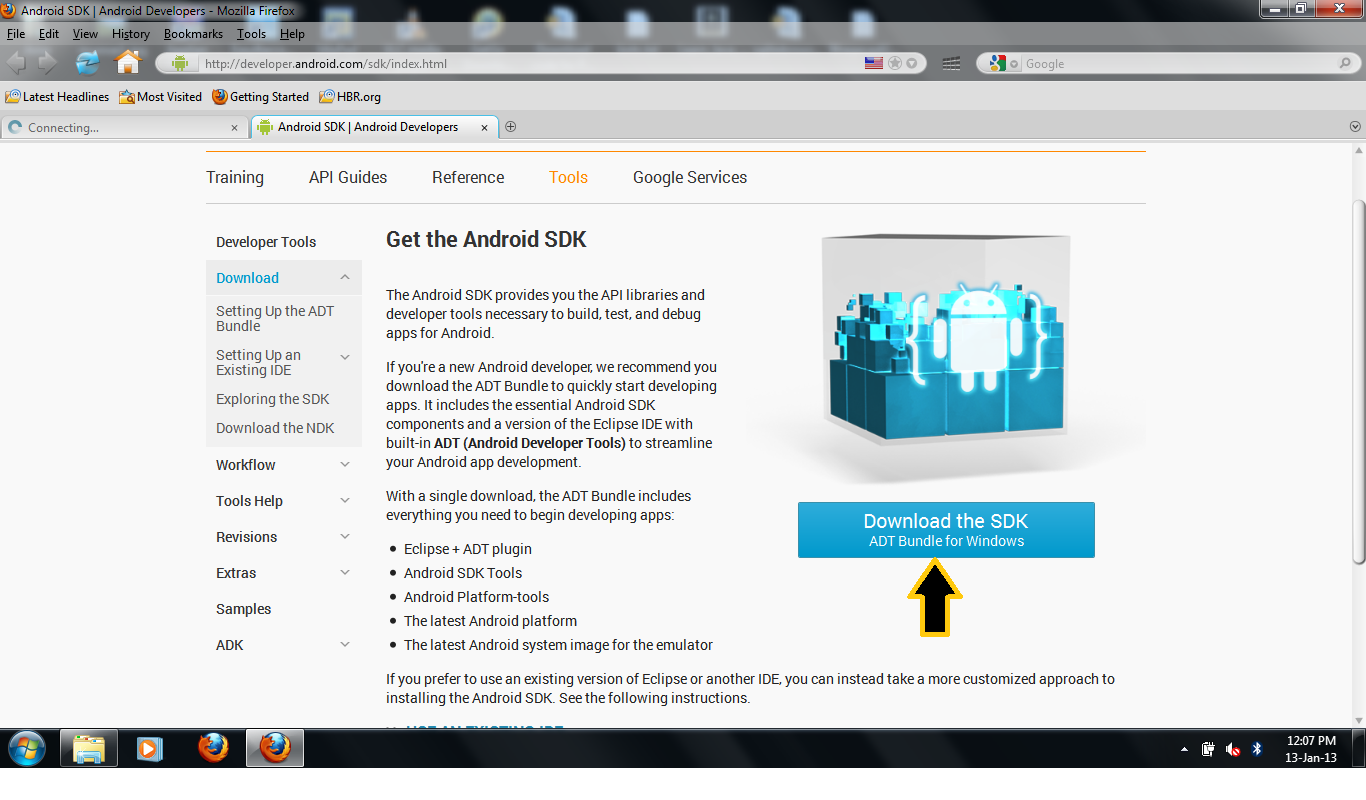
Now click to agree to the terms and conditions, select 32bit or 64 bit, if you don't know your system is 32 or 64 bit then follow the instruction down below to check it.

(TIP) If you don't know your system is 32 bit or 64 bit, then Right click on the icon named "Computer" and click "properties" Now a window named "basic information about your computer is opened, The system types specifies it is 32 bit or 64 bit. (see the image below for details)
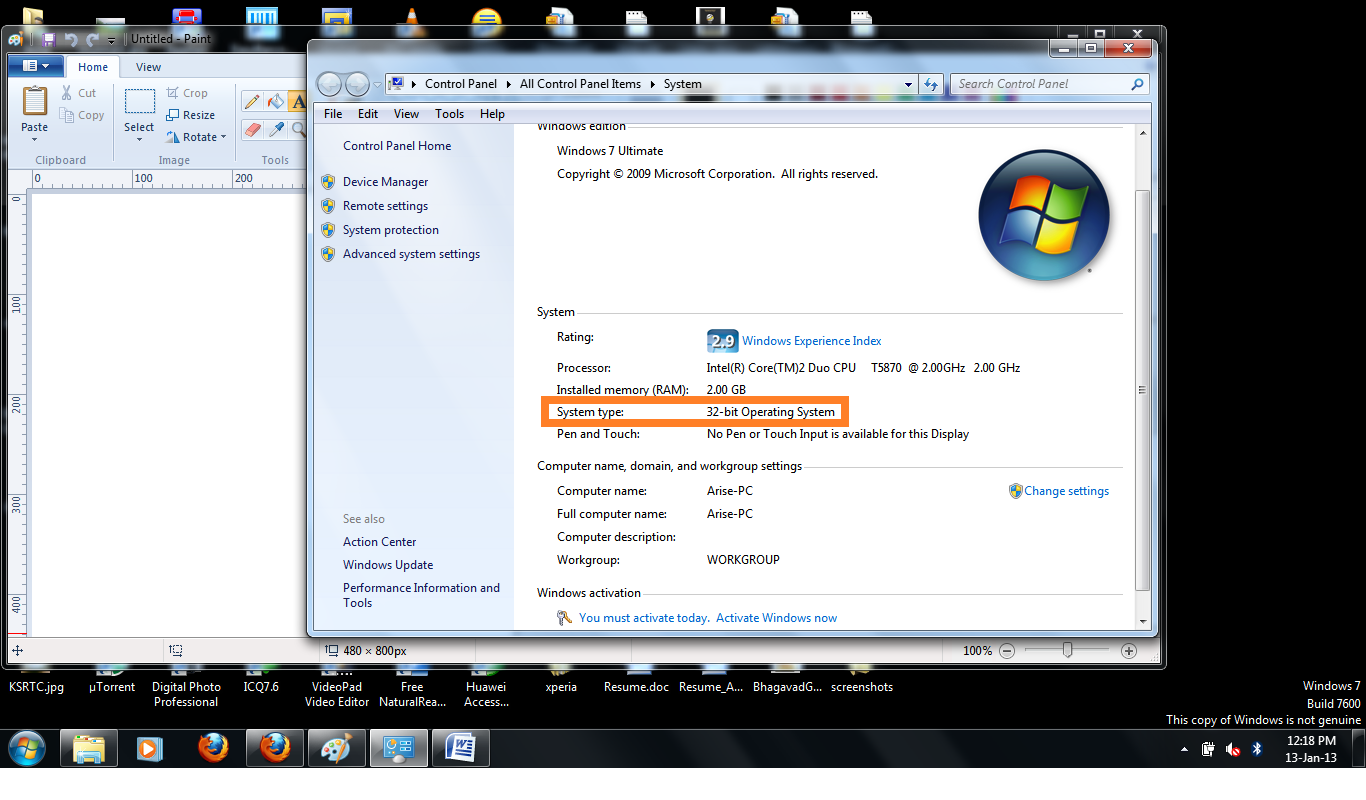
Now click download and Download will automatically started. If you use Internet Download Accelerator,
it will automatically detect the link and start downloading. IF not clcik the green plus button on the tool bar and copy,paste the download link and click "start download". (see the image for detials)

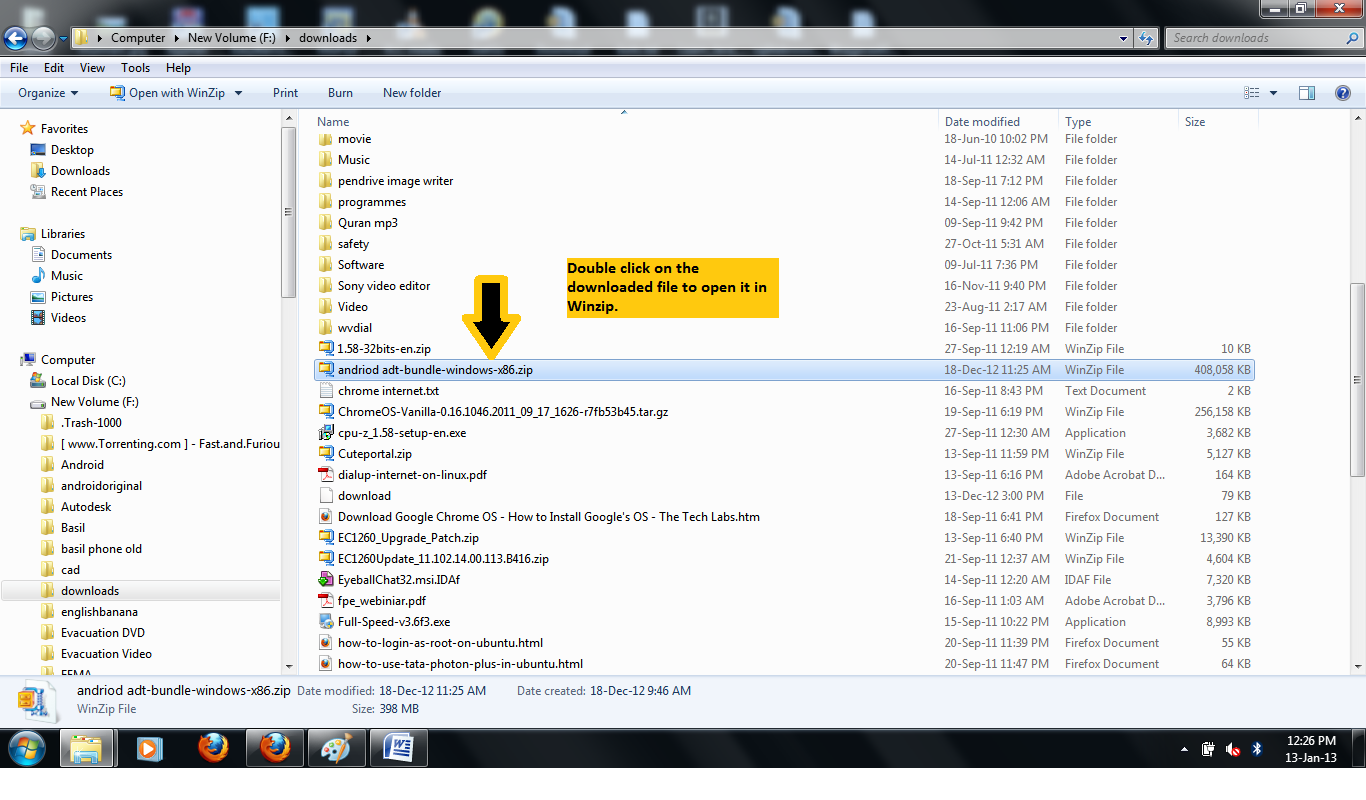
When your download completes go the folder where the file is downloaded and clcik the zip file named
"android adt...." to open it in Winzip. (as shown below)

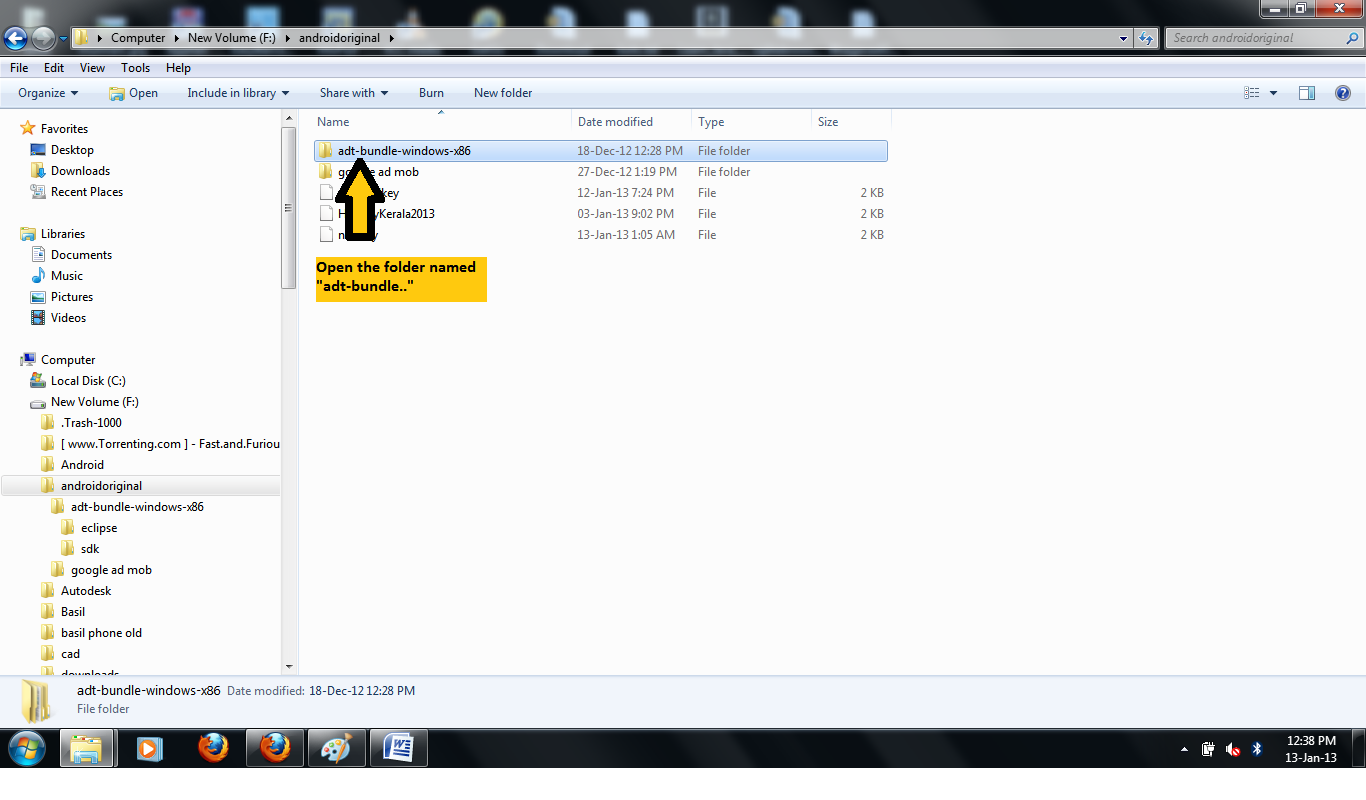
Now all the files will be extracted and the folder window is automatically opened (as shown below). Now double click on the folder named "adt-bundle..." to open it.
Now you can see a folder named "eclipse" click to open it. (as shown below)

Inside the folder you can see a file named "eclipse.exe" click on the icon to launch Eclipse. Note that android uses Eclipse, an open source platform with ADT (Android Development Tools) plugin to develop Android applications. (TIP) Please note that there is no need to install it in Windows. That's why the exe file is directly available. (TIP) Just right click on the file and make a shortcut to the desktop so that you can launch it easily next time. You don't have to worry about other files and folders as everything will be accessible from Eclipse.
The Android Developer site will also give you all the directions for downloading and running the SDK. You may also download it for Linux,Windows and Mac. Now you have successfully completed the first step in Android Development. We will discus the other topics in the next chapter. Mean while just go through the resources links on the right side to learn about Android Development. If you are new to Jave read this PDF Learn Java For Android
(TIP) If you read pages from 43 to 82 you will get a basic idea.
(TIP) Eventhough I have explained it for Windows, I strongly suggest you to use Ubuntu Linux for Android Development, as the emulator is slow, always crashing and not responding in Windows. Unlike Windows, Ubuntu is a cute,very fast,quick booting and easy to use OS with 1000's of free softwares. In Ubuntu ADT is very fast and stable. Setting up ADT bundle in Ubuntu is as easy as in Windows. You may Download Ubuntu free from here (750MB)
Now you can move to the NEXT CHAPTER

Wow Great information about toolbar. Toolbar is best way to increase your internet work speed and also increase online profit. Custom toolbar increase your online reputation and branding also. Learn more about Toolbar development then visit our website.
ReplyDelete
ReplyDeleteNice post.Give it up. Thanks for share this article. For more visit:android development
Wow great information about toolbar development. Hire toolbar developer exhaustive analysis is capable of reshaping toolbar solutions with accuracy and precision. Here, cutting-edge technology in collaboration with cost-efficient methods is the stand-out corner for toolbar developer.
ReplyDeleteIs this requirement of internet connection if not then how can i installed it.because i try it i can't get success in it.
ReplyDeleteInternet connection is required for downloading only, After down load you have to extract the zip file and run the Eclipse.exe file. Can you tell me what you have done so far?
DeleteNICE BLOG!!! Thanks for sharing useful information about FNT Software Solutions and being one of best Software Training institute in Bangalore we agree that this blog is very useful for the students are searching for best software courses, I would really like to come back again right here for likewise good articles or blog posts. Thanks for sharing...Android Training Bangalore .
ReplyDeletenice blog sharing information related to web developments
ReplyDeleteI just want to say that thank you very much for sharing the both ways.
ReplyDeleteAndroid Development
Good way to explain with image that helps to users, how to download and install Android SDK. This blog helps to newbie android developers. Thanks.
ReplyDeleteiPad Application Development
Mobile App Development Company
Great post, Thank you for these links and your insights! I'm always looking for gaining new knowledge. Thanks for this.
ReplyDeletewebsite design
This post is truly very useful for the android developers and it help them to increase their knowledge and make them expert in creating any android apps. This will increase hire android app developer ratio in the market for best app creation.
ReplyDeletehello,
ReplyDeletei just want to say that you have clearly mention the process very clearly and i also found it is very much easy to understand .
keep sharing.
Thanks for such a nice post. I found that you shared a complete information on Android Application Development. OnGraph Technologies is a leading Indian base top Mobile app development Company.
ReplyDeleteApp Maisters is an expert iOS app development company in the US. We are a technology company that builds custom world-class mobile solutions for our clients.
ReplyDeleteThis comment has been removed by the author.
ReplyDeletei have created blog on android..do visit my blog
ReplyDeletehttp://top-3-android-blog.blogspot.in/2015/04/android-json-parsing-tejas-jasani.html
i have created blog on android..do visit my blog
ReplyDeletehttp://top-3-android-blog.blogspot.in/2015/04/android-json-parsing-tejas-jasani.html
my link address is
ReplyDeletehttp://top-3-android-blog.blogspot.in/2015/04/android-json-parsing-tejas-jasani.html
my link address is
ReplyDeletehttp://top-3-android-blog.blogspot.in/2015/04/android-json-parsing-tejas-jasani.html
The Screen shots are very helpful and easy to understand
ReplyDeleteAndroid application development in chennai
Hi there…my friends thought that I was crazy, as I was always recording what I was hearing. From ringtones to traffic noises, I have a huge collection of seconds-to-minutes recordings. Your article on how I can cash in on my hobby and to make money as a freelancer is awesome. Now, I know that I am not a wierdo. I have registered at some micro job sites like sell logo design , retro style poster flyer which are sure to help me make money for my passion. Can’t wait to see the astonished looks as I wave a wad of notes on their faces! Ha..ha…
ReplyDeleteThanks for sharing excellent information. Your site is very cool . I am impressed by the details that you have on this site.Web Design Companies Bangalore | Web Design Bangalore
ReplyDeleteThanks for shared your valuable experience as a blog post. Still we are expecting a more post from you. I like update regularly this blog.
ReplyDeleteweb designers bangalore
Its the great information for me..I have a search the more number of blogs about how to install in android platform.But in have a getting the right information for your blog..i have a listed this blog in favorite
ReplyDeleteWeb Design Company Bangalore | Web Development Company Bangalore
That was really helpful Admin. Appreciate your work on this blog. Look forward to read more mobile application development
ReplyDeleteThis is one of the awesome and Important post.I like your blog description.
ReplyDeleteAndroid training institute
Thank you so much for the informative post. I used it as a reference to train my students.
ReplyDeleteHTML Training in Chennai | HTML Training in Chennai
Awesome Post...I have a get the best information about android application installation...your presentation way is the awesome thank you for sharing the great information....Web Design Company Bangalore | Web Development Company Bangalore
ReplyDeleteAwesome article about "android app development" ,..Thank you for this helpful article,.
ReplyDeleteThanks for a such informative post. Keep posting like this..
ReplyDeleteAndroid Development
Free Android Tutorial: Click Here For Tutorial
ReplyDeleteAndroid Tutorial For Beginner: Click Here For Tutorial
Great post. Thanks for sharing this post. Android Training in Chennai
ReplyDeleteTHis is too good about mobile technology,
ReplyDelete"new technology"
If you want to make a best mobile phone application ,.you should concern with this blog,.
ReplyDeleteIt's too good,
"auto dealer app"
Good blog content . I am impressed your post. Thanks for sharing this post. Android Training Institute
ReplyDeleteNice post.Give it up. Thanks for share this article. For more visit:android development
ReplyDeleteIf you want to make a web design, web development, S.e.o and custom android app development so you join Webnet Pakistan company. It's too good.
ReplyDeleteThank You !! Awesome Blog.
ReplyDeleteGreat knowledge with good concept about Android Development.
Keep sharing your knowledge with us. If anybody want more help ..click on
Android Interview Questions
Android Tutorial
Android Training in Noida
Thanks for sharing this Updated info. I am working as mobile app developer and was looking for this info. Thanks for sharing Info and knowledge.
ReplyDeleteThanks for providing great information.Its very easy to understand and helpful to me. Buzz Application
ReplyDeleteReally good post..Pls visit us:web design india
ReplyDeleteThanks for giving explanation about set SDK environment to develop a android app i expect more tutorial like that
ReplyDeleteso keep sharing thanks...
Web Development Company Bangalore | Web Design Company Bangalore
You have shared a valuable information about web app,.
ReplyDeleteonline catalog company
Keep sharing more like that,.
ReplyDeleterecruitment website design
Thanks for sharing..Pls visit us:web design india
ReplyDeleteKeep sharing more informative blog like that
ReplyDeleteios app development company bangalore
Looking for best web application Development Company in Dubai? We offers customized web application development services in UAE for small to large business.
ReplyDeleteWeb Application Development Company Dubai
Jankosoft is a leading company offering dedicated website design and various other services and made an impressive image among its clients.
ReplyDeletesingapore web design company
web design hong kong
mobile app development singapore
It's really a nice post about mobile app development,
ReplyDeletedesarrollo de apps moviles
Awesome..You have clearly explained ...Its very useful for me to know about new things..Keep on blogging..
ReplyDeleteSEO training in chennai
This is a awesome idea about the Android Development services . The services and the operations are so helpful in mobile area.
ReplyDeletethis is very informative and more useful to know about your information keep updating.
ReplyDeleteAndroid training in Chennai
This is a great article. It gave me a lot of useful information. thank you very much. Can you play more games at :
ReplyDeleteninjago games | swords and souls | subway surfers | goodgame big farm | strike force kitty 2 | agario
It's really nice and informative post,
ReplyDeletedeveloper for iPhone
Nice. Your explanation was very clear with images.
ReplyDeleteThanks for the article
Web Design Company Bangalore | Website Development Company Bangalore
I simply couldn’t depart your site before suggesting that I really enjoyed the usual information an individual supply in your visitors? Is going to be again steadily to check out new posts.
ReplyDeleteAndroid Training in Chennai
Good day. I was impressed with your article. Keep it up . You can also visit my site if you have time. Thank you and Bless you always.
ReplyDeleteCustom Software Development India - Nintriva
App Maisters is an expert ios apps development in the US. We are a technology company that builds custom world-class mobile solutions for our clients.
ReplyDeleteReply
Thankyou
ReplyDeleteAndroid Training in Chennai
Android Training
I am regular reader of your blog and no doubt it all stuff is awesome. The best thing about your sharing and posting is that you always provide content that is helpful for both the newbie and experts. Looking for more stuff and tutorials.
ReplyDeletestore
Wow finally i got good article about android development process from beginning.Thanks for sharing...
ReplyDeleteAndroid Application Development Company in Noida.
Wow what a cool blog you have here! I am impressed. You really put a lot of time and effort into this.
ReplyDeleteANDROID Training in Noida
This is great. I read this post and enjoyed a lot. Its too much informative and I want to keep it bookmark for future use. Thanks.
ReplyDeleteiphone app development
I appreciate the effort behind presentation of idea via content and screenshot. Keep up the great work
ReplyDeleteWeb Design Company Bangalore | Website Designing Services Bangalore
Thanks for shared your valuable experience as a blog post. Still we are expecting a more post from you. I like update regularly this blog.
ReplyDeleteAndroid App Development Company
Thanks a lot, Great news!!!
ReplyDeleteEcommerce Web Designing Company Bangalore | Magento Web Designing Company Bangalore
Excellent blog!. I was looking for Web Development company and I landed your website through google search. I found your blog very interesting. android development company
ReplyDeleteWow finally i got good article about android development process from beginning.Thanks for sharing...
ReplyDeleteTipEnter Technologies is a leading Android app development company in India.
Great information about android development and thanks for tips on SDK installation.
ReplyDeleteWebsite Designing Company in Bangalore | Web Development Company in Bangalore
I really like this article ,..You have shared really an amazing and nice post..
ReplyDeleteandroid nougat news
Your post has a good article. Share more updates. Website Designing Company | Website Development Bangalore
ReplyDeleteCheck Free and Latest Android Tutorial: Click Here For Tutorial
ReplyDeleteNew Year 2017 is an event of pleasures. So we should praise it together with charming and a brilliant flavoring of move gathering, boundless beverages, mixed drink, barkeeps, bucketful of snacks, commencement to be the most energizing one and exquisite scrumptious food stuff with New Year bundles close Delhi.
ReplyDeletevisit: http://newyearpackagesneardelhi.com/
java training in chennai
ReplyDeletedot net training in chennai
php training in chennai
Nice post with very good information. Keep sharing. Thank you for sharing this information.
ReplyDeleteSoftware development company india
This is really a nice and informative post.
ReplyDeleteMobile application company.
be projects in chennai
ReplyDeleteieee java projects in chennai
ieee dotnet projects in chennai
ns2 projects in chennai
bulk projects in chennai
Thank you for your nice post. Keep updating.ERP software solution chennai|Leather ERP software chennai|ERP in chennai|ERP for Trading companies|ERP for Franchise
ReplyDeleteCroma campus is best training institute and great Android Training in Noida Cromac campus top IT company job placement support.Join us Croma campus
ReplyDeleteI really like this article ,..You have shared really an amazing and nice post..
ReplyDeleteTop Digital Marketing Company in Rohini
sukere InfoTech Quality capacities depend on a 3Q approach: Quality work force, Quality Process and Quality Communications. Every venture at InfoTech is under uniform control of a genuine quality confirmation segment that screens extend exercises and results at every advance stage.
ReplyDeleteBest web plan organization Chennai-Sukere infotechs
I was searching for the blogs on Android and I just found this one.... It is one of the best blogs on Android...
ReplyDeleteANDROID TRAINING IN NOIDA
nice and great information. Really helpful
ReplyDeletebest online website development courses
Really awesome blog
ReplyDeleteAndroid App Development company in Noida
Post is very informative,It helped me with great information so I really believe you will do much better in the future.
ReplyDeletemobile application developer singapore
web development company
ecommerce website development singapore
Wow finally i got good article about android development process from beginning.Thanks for sharing...
ReplyDeleteMobile App Development Noida
wow
ReplyDeletegreat information you have just provided
see Android Apps Development Company
At that point, what truly matters is the support you can get from expert specialists in various sorts of fields from many surely understood and imperative business colleges. They all give qualified Home tutors for M Mobile Application Training, on the web and disconnected specifically or through different sorts of courses.
ReplyDeleteReally an interesting and great informative blog.... You have provided all the information in a very systematic way... good job..
ReplyDeleteAndroid TRAINING IN NOIDA
Mobile app for androids is mainly low investment and High ROI. It is an open source which means it can interact the community for upcoming expansions of android application development. It makes the platform very attractive with very attractive for handset manufacturers and wireless operators. Which is easy to integrate.
ReplyDeleteA very awesome blog post. We are really grateful for your blog post. You will find a lot of approaches after visiting your post. I was exactly searching for. Thanks for such post and please keep it up. Great
ReplyDeleteandroid app development companies in Bangalore
Thank you for this golden advice you shared here. Thank you for such a great article :)
ReplyDeleteMobile App Development Company Indore
I really appreciate your article. the post has excellent tips which are useful. this post is good in regards of both knowledge as well as information Android App Development company in Noida
ReplyDeleteI have attended the Android Training in Croma Campus, coaching done by best team of trainers. I’m from Desktop support background; from Croma field I understood every and each topic well with simple examples and live demo sessions. Croma Campus offers extremely simple teaching and adoptable trainers whom we have a tendency to don’t hesitate to raise even an awfully basic doubt and that’s his speciality. I got placed with Birla Soft with good package. I would love to recommend to all my friends.
ReplyDeletethis is the fabulous knowledge which is you shared./.....thanks for the sharing......
ReplyDeleteAndriod Training in Noida
Awesome blog for Custom Android Mobile Application Development, its is of great use. Looking forward for more posts like this. Thank you
ReplyDeleteHave read many blogs on the net but have never come across such a well-written blog. Good work keeps it up. Android Tablet Development
ReplyDeleteThanks for sharing your fabulous idea. This blog is really very useful. iPhone Apps Development Company India
ReplyDeleteValuable for information if there is any other regarding this kindly revert me back on thisAndroid App Development Company in India
ReplyDeleteYour article is really helpful for the android developers. Really explained in a nice way.
ReplyDeleteJava Developer Jobs in Indore
your post is very good & creativity you just have shared Android App Development Company Noida.
ReplyDeleteyour information is really awesome as well as it is very excellent and i got more interesting information from your blog. android Training in Chennai
ReplyDeleteGreat Article… I love to read your articles because your writing style is too good, its is very very helpful for all of us and I never get bored while reading your article because, they are becomes a more and more interesting from the starting lines until the end.
ReplyDeleteWeb Development Company in Chennai
You want to become expert in Android then complete Android Training in Delhi by IT company.
ReplyDeleteThanks for all the information, it was very helpful I really like that you are providing information on android app development . I really like that you are providing such information, thanks.
ReplyDeleteAndroid App Development Company
If you're ready to branch out into Android and build amazing apps, these platforms will save you hours of development work. Web Design Bangalore
ReplyDeleteOur India Email Database makes Email Marketing extremely sensible. These focused on email databases are the best approach to discover new Business Opportunities and achieve client through Email advertising. Our database have great Hit proportion.
ReplyDeleteBest Bulk email in Chennai
Superb, I really enjoyed very much while reading this article. Really it is an amazing article. I had ever read like this article. I hope it will be very helpful for all. Thank you so much for this amazing article and please keep update like this excellent post. Thank you for sharing such a great article with us.
ReplyDeleteEngineering Colleges,Mechanical Engineering Colleges in Chennai
You are fascinated to lead your profession in the android, doing android Training in Chennai at Besant Technologies who is one of the leading training providers with well experienced trainers and the creative teaching environment which upgrades you to learn rapidly. Android Training in Chennai |
ReplyDeleteAndroid Training in Chennai |
Android Training in Chennai |
Android Training in Chennai |
Wow finally i got good article about android development process from beginning.Thanks for sharing...
ReplyDeleteAndroid App Development company in Noida
ReplyDeleteReally awesome blog. Your blog is really useful for me. Thanks for sharing this informative blog. Keep update your blog.
iPad Service Center In Chennai
nice blog. clear explnation of How to download and Install Android Development Platform SDK the way of explanation is good. is is vey helpful for me. keep sharing updated andriod tutorials.....
ReplyDeleteThanks for the valuable information, keep sharing more knowledgeable post. Best Web Design Company Bangalore | Web Development Company Bangalore
ReplyDelete"That’s a huge collection of your blog. Really it’s amazing"!!
ReplyDelete"this is superb.. thank you.."!!
android apps development service
Nice blog, it is expanded and intersting to read thanks for sharing...Website Design Company Bangalore |
ReplyDeleteWebsite Development Company Bangalore
I think its must be helpful and informative for us. Thanks for sharing your nice post.
ReplyDeleteWeb Design - Sukere Infotechs
thank you for sharing....now this is the time to lead your life then learn Dot Net Training in Chennai get a IT JOB easily.more details Android Training in Chennai
ReplyDeletehi welcome to this blog. really you have posted an informative blog. it will be really helpful to many peoples. thank you for sharing this blog.
ReplyDeletejava training in chennai
Quuick is a proficient web development company in Hyderabad, that offers an extensive range of services like web application development, website designing, e-commerce solutions, application development, web hosting services.Web Development Company In Hyderabad
ReplyDeleteGreat post. Keep it up. Thanks for advice. It is wonderful information for me Web Designing Company Bangalore | Website Designing Company Bangalore
ReplyDeleteI am actually getting ready to across this information, is very helpful my friend. Also great blog here with all of the valuable information you have
ReplyDeleteDigital Marketing Essex
Graphic Design Agency Essex
Most of well known from here, this is very great information, thank you. Web Design Companies Bangalore | Web Designing Companies Bangalore
ReplyDelete"this is superb.. thank you.."!!
ReplyDeleteios app development company
Nice to read this article..... Thanks for sharing this information.....
ReplyDeleteHTML training in chennai
This comment has been removed by the author.
ReplyDeleteThis comment has been removed by the author.
ReplyDeletewe are Delhi based Web Design Company. but we deals all over india and overseas as well. we have Dubai, Singapore, hong kong , London customer as well.
ReplyDeleteThank You for sharing your article. This is very informative article to Android mobile apps development.
ReplyDeleteKeep it up.
mobile apps development company
That was much descriptive post you have shared with us,.
ReplyDeletevideo downloader apk
This is a really nice collection. Many thanks for gathering them all together for us. I’ve got a couple in mind for my next project.
ReplyDeletemobile app development for android
Thanks for sharing such a meaningful information. It was short but informative.
ReplyDeleteAndroid Application Development Company in Noida
This is extremely helpful information. Great work. It is very interesting to learn and easy to understood. Thanks for sharing information. Please let us know more information . If you guys interested to Android join android development training in pune.
ReplyDeleteThis article is really very interesting and enjoyable. I think its must be helpful and informative for us. Thanks for sharing your nice post. Technology Company in India
ReplyDeleteIt's really an amazing and nice post,
ReplyDeleteBRAND NEW car channel
Ecosmob is one of the best Android App Development Company in India providing innovative Android Application Development services.
ReplyDeleteAndroid Application Development
That was really Good information your blogs. I am really Appreciate your work on this blog. Look forward to read more Details Android Training in Noida
ReplyDeleteThanks for Sharing this great article..Its really nice and useful for us… keep sharing.. Technology Company in India
ReplyDeleteYou can take android training in Jaipur. BR Brains provides training for various programming languages. If you are searching for an Android training company in Jaipur, call here - +91-7821055532.
ReplyDeleteThanks for sharing the information and keep updating us.This information is really useful to me.
ReplyDeleteThis comment has been removed by the author.
ReplyDeletethanxx for sharing useful info.....
ReplyDeleteWebsite Designing Company in Delhi | Website Designing Company in Rohini | Website Designing Company in Kirti Nagar
Thank You for sharing your article. This is very informative article to Android development platform SDK.
ReplyDeleteKeep it up.
mobile apps development company
We share in this idea was very helped to me.I'll be easy to understand for our great informative.
ReplyDeleteSelenium Training
Selenium Online Training
Learn Selenium Training
would like to tell you that this write-up is awesome, great written and include almost all important info. I would like to see a lot more articles like this.
ReplyDeleteWeb Design company in Hubli | web designing in Hubli | SEO company in Hubli
Yes, I must say this is a wonderful blog! It has the information which I was actually looking for, Thanks for sharing with us. webdesign firma
ReplyDeleteThis comment has been removed by the author.
ReplyDeleteRight,Good to see these helpful information here..Thanks lots for sharing them with us.
ReplyDeleteAndroid App Development Company in India
Right,Good to see these helpful information here..Thanks lots for sharing them with us.
ReplyDeleteAndroid App Development Company in India
Awesome Post...I have a get the best information about android app installation...the way of presentation this blog is awesome...if anyone need to technical help regarding android app development then they contact - https://www.prasad-solutions.com/android-application-development/, They have expert android app developer who can assist you 24 hours.
ReplyDeleteThanks for sharing your fabulous idea. This blog is really very useful.Software Development Services in Noida India
ReplyDeleteThanks for sharing such a valuable information.This post is very useful for me.Android Apps Development Services in Noida
ReplyDeleteThanks for all the information, it was very helpful I really like that you are providing information on android app development . I really like that you are providing such information, thanks
ReplyDeleteAndroid Application Development Company
We share in this idea was very helped to me.I'll be easy to understand for our great informative.Thanks for sharing this kind of blogs. Iam very interest to read your blog.
ReplyDeleteAndroid Training in Chennai
ReplyDeletePlease about me android apps Information...
Android ios App Developers in India
Android applications taking off high in the market, it may very well appear a piece of cake to the layman as to an Android Application Development Company in India.
Very Nice...Thanks for sharing this great post.If you want to develop any app then you can visit:Android App Development Company In Hyderabad
ReplyDeleteThank you for taking the time to provide us with your valuable information. We strive to provide our candidates with excellent care and we take your comments to heart.As always, we appreciate your confidence and trust in us.
ReplyDeleteJava Training in Chennai
Excellent post
ReplyDeleteApp Development in Chennai
These ways are very simple and very much useful, as a beginner level these helped me a lot thanks fore sharing these kinds of useful and knowledgeable information.
ReplyDeleteMobile App Development Company
Mobile App Development Company
Mobile app Development Companies
Thankful for such splendid blog yours...!
ReplyDeleteMobile Application Development in Delhi
This comment has been removed by the author.
ReplyDeleteThanks for a sharing a information.
ReplyDeleteApp Developers in Delhi
Mobile App Development Company Delhi
Mobile App Developers in Chennai
Mobile Game Development Hyderabad
Game Development Company in Bangalore
Hire Game Developer Bangalore
Virtual Reality Development company in Bangalore
VR Game Development Company India
App Developers India
Mobile App Development Company Delhi
"Pretty article! I found some useful information in your blog, it was awesome to read, thanks for sharing this great content to my vision, keep sharing.."!!
ReplyDeleteMaterial Design for Android
Thank you for your post. This is excellent information. It is amazing and wonderful to visit your site.
ReplyDeleteHappy blogging and keep posting
Mobile app training institutes
Android applications taking off high in the market, it may very well appear a piece of cake to the layman as to an
ReplyDeleteAndroid Application Development Company in India.
Very impressive, I really like the way you present your blog...Thanks for sharing...
ReplyDeleteMobile Application Development Services In Hyderabad
SukereInfotech is the best high-quality vendors of search engine optimization training in Chennai with search engine optimization specialists.
ReplyDeleteSEO Training in India
Nice work guys. MSP Concepts is one of the leading iPhone App Development Company and Services provider based in USA and UK with a development centre in India. For more details please visit our site - Iphone/Ios Application Development | MSP Concepts
ReplyDeleteNow the customers want everything in their mobile that is why the mobile app development company in India is growing rapidly in this modern era. You can show all the facilities in a particular app on the several platforms.
ReplyDeleteI am very happy when read this blog post because blog post written in good manner and write on good topic. Thanks for sharing valuable information.
ReplyDeleteseo services in chennai
Wow such a great post thanks for sharing this post.
ReplyDeleteBest Web Design Company in Bangalore
Wow.. awesome blog. Thank you so much for sharing this wonderful information with us. Keep posting such wonderful blogs.
ReplyDeleteWebsite Designing in Punjab
ReplyDeleteThanks for posting useful information.You have provided an nice article, Thank you very much for this one. And i hope this will be useful for many people.. and i am waiting for your next post keep on updating these kinds of knowledgeable things...
Web Design Development Company
Ultimate post and very informative, you have explained well with detailed explanation. You can also share these type of content on sites like OS Business Opportunities
ReplyDeleteGiven so much info in it, These type of articles keeps the users interest in the website, and keep on sharing more ... good luck.
ReplyDeleteAndroid Training in chennai |Android Training in Velachery
Nice post..Can u visit us:Web designing in Chennai
ReplyDeleteExcellent post!!!. The strategy you have posted on this technology helped me to get into the next level and had lot of information in it...Android Training in Bangalore
ReplyDeleteHey Nice blog,Thanks for sharing this blog.!!!
ReplyDeleteBest Java Summer training in lucknow
Best Php Summer training in lucknow
Summer training in lucknow
Summer training Company in lucknow
Excellent and very cool idea and the subject at the top of magnificence and I am happy to this post..Interesting post! Thanks for writing it.What's wrong with this kind of post exactly? It follows your previous guideline for post length as well as clarity.
ReplyDeleteEmbedded Training in Chennai
I simply want to say I’m very new to blogs and actually loved you’re blog site. Almost certainly I’m going to bookmark your blog post . You absolutely come with great well written articles. Thanks a lot for sharing your blog.
ReplyDeleteandroid development course fees in chennai | android app development training in chennai
Interesting article thanks for sahring SEO Services atSukere Infotech
ReplyDeleteThanks for sharing your fabulous idea. This blog is really very useful.Mobile App Development Company in India
ReplyDeleteThis is a great post. I like this topic.This site has lots of advantage.I found many interesting things from this site. It helps me in many ways.Thanks for posting this again. android development company ludhiana
ReplyDeleteRight,Good to see these helpful information here Web Designing Services In India.Thanks lots for sharing them with us.
ReplyDelete
ReplyDeleteGood Post! Thank you so much for sharing this pretty post, it was so good to read and useful to improve my knowledge as updated one, keep blogging…Android Online Training
This post is really nice and informative. The explanation given is really comprehensive and informative.
ReplyDeleteAndroid App Development Company In Hyderabad
Thanks for sharing such a valuable information.This post is very useful for me. Mobile App Development Company in India
ReplyDeleteRight,Good to see these helpful information here Web Design Services in India.Thanks lots for sharing them with us.
ReplyDeleteYou made some good points there. I did a search on the topic and found most people will agree with your blog...
ReplyDeleteAndroid Training in Bangalore
Right,Good to see these helpful information here Android Application Development Company in Noida.Thanks lots for sharing them with us.
ReplyDeleteThanks for sharing it. We are on of the best Android development company. For more details can contact. Android Application Development Company
ReplyDeleteThank you so much for the informative article share with us Mobile App development companies
ReplyDeleteValuable for information if there is any other regarding this kindly revert me back on this Android App Development Company in India
ReplyDeleteVery nice blog...Thanks for posting...
ReplyDeleteAndroid Application Services In Hyderabad
Thank you so much for the informative article share with us iPhone Apps Development Company
ReplyDeleteNice post! I thank you for sharing this nice blog with us. Likewise, I would like to say something that Happy Heap Marketing is also one of the Web Designing company in Noida
ReplyDeleteHi,
ReplyDeleteNice guideline.
Suraj Yadav
Android Software Developer
Pretty article! I found some useful information in your blog, it was awesome to read, thanks for sharing this great content to my vision, keep sharing..
ReplyDeleteAndroid App Development Company
iOS App Development Company
NIce artcle
ReplyDeleteAndroid Application Development Company
Thanks for sharing such a valuable information.This post is very useful for me.
ReplyDeleteThanks for this nice and informative post. I think you have shared a complete information about installing android development platform. Keep Sharing!!
ReplyDeleteandroid app developemnt